Most practice management software stores your files.
LexiManage works on them.
Trust accounting, twenty-five calculators, 426 court forms and financial disclosure — one Ontario platform that cites the rule behind every number, and can run on infrastructure your firm actually owns.
Each loop is a single thing being done in the demo firm, exactly as a clerk or lawyer would do it, with the result on screen. Every name and figure is invented. Rest on a loop to pause it; the demo firm itself is one click away.
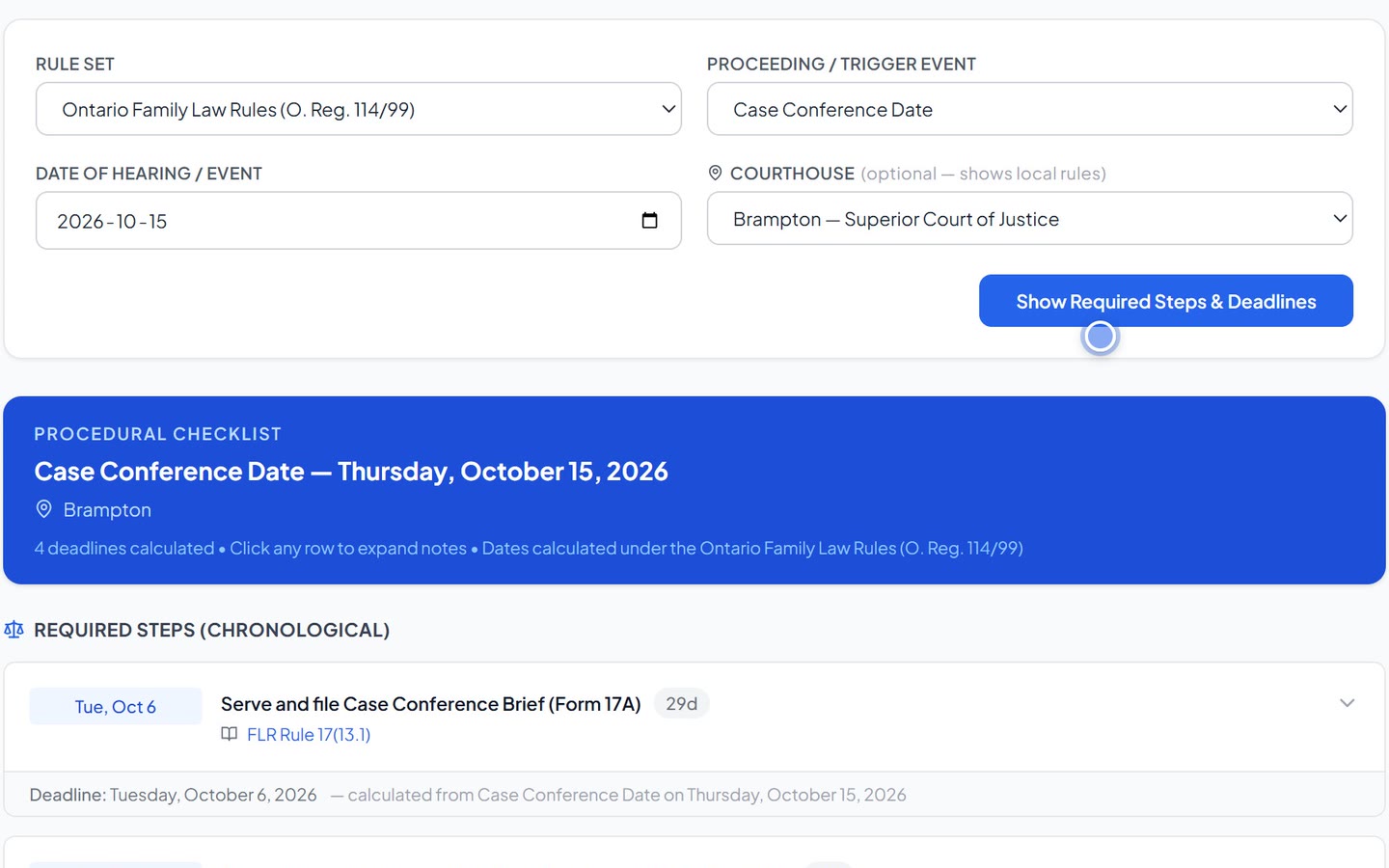
Pick the rule set and the event, enter the date. Every step and deadline the rules require, counted the way that rule set counts, with the rule cited beside each — Family Law Rules, Rules of Civil Procedure or Small Claims Court.
Try it in the demo firm →One click runs the With Child Support formula on the file's own incomes: the range, the table child support, duration, each party's net disposable income and the share it produces — then the details behind every figure, and a slider to take a position within the range.
Try it in the demo firm →Record a retainer. The ledger, the balance and the printable receipt follow at once. Try to pay out more than a matter holds in trust and the database itself refuses the entry — not a warning someone can click past. Cash over the By-Law 9 limit on one file is refused unless you record the exception that applies, and a reconciliation will not close until the bank, the general ledger and the client trust listing agree.
Try it in the demo firm → What is checked, and what is not →One click builds Form 13C from the two sworn statements — category totals and both equalization positions filled — and files it in the matter's documents, ready to finish in Word. The same engine fills 426 forms across the Family Law Rules, the Rules of Civil Procedure and the Small Claims Court.
Try it in the demo firm →With both parties' Form 13.1 on file, LexiManage lines up each asset and debt and shows both positions. Type the other side's figure and the gap and its equalization effect appear on the spot — the demand letter and Form 13C draw on the same ledger.
Try it in the demo firm →A calculator and a form will get you to an answer. Standing behind it — in cross, to a client, to the Law Society — is a different obligation, and there are three of them. The software is built around all three rather than around a feature list.
Every support figure, deadline and disclosure check traces to the rule behind it — SSAG, the Guidelines, By-Law 9, O. Reg. 114/99 — in plain language, linked to the source. Deterministic, not AI guesswork you can't defend.
Run it as a firm-owned install where client files never touch anyone else's servers — or hosted in Canada, by a Quebec company with no US parent, on storage encrypted with a key that is never kept on the server. Either way, nothing from your database — matters, documents, contacts, accounts — is ever sent to an AI.
A full double-entry ledger underneath everything — By-Law 9 trust, HST filing, fixed assets, disbursements, year-end close, and an integrity check that ties the trust listing to the bank three ways. Your accountant will recognise it.
LexiManage reads the file the way the other side will — and the way LAWPRO does. It surfaces the missed limitation, the thin disclosure, the sworn statement that won't survive cross, the trust rec that's overdue. All from data you already have. None of it is sent to anyone else.
Family law is the depth — but LexiManage runs the entire firm, so you're not stitching a calculator to a billing app to a trust ledger. Each card shows the real screen; the demo firm has all of it, live.
Matter lifecycle, conflict search, ethical walls, client intake and verification.
Procedural advisor for every SCJ region, limitation tracking, key-date automation.
By-Law 9 trust: overdrafts refused by the database, the cash limit enforced, three-way reconciliation checked before it closes.
Docketing, pre-bill review, batch runs, LEDES export, A/R collection, bill of costs.
SSAG (with/without CS), child support for every province, parenting time, arrears, CCB.
Family Law Rules, Rules of Civil Procedure and Small Claims Court forms, filled from matter data.
Form 13/13.1 end to end, PDF import of the other side's statement, consistency checks.
Secure intake, disclosure, invoice viewing and document sharing — on your infrastructure.
Full financial statements, HST filing, fixed assets, year-end close, custom report builder.
Not a support calculator with a practice system attached — the whole analytical apparatus of a family file, tax-year and province aware, with the derivation on screen beside the answer.
Every SSAG result is a low, a mid and a high. The negotiation is never about the range — it is about the point inside it, and why. Move the slider.
Every point above is a real solve through the same tax engine the product uses — federal and Ontario tax, CPP and EI at each figure — not an interpolation between two endpoints. The scenario is invented; the arithmetic is not.
The monthly figure, each party's net disposable income and the duration recalculate together. Chapter 9 factors shade the band your facts actually support, so the range narrows to the part you can argue for.
The point taken flows into the report, the client letter, the offer and the draft order — with the reasoning attached. One stance, stated the same way everywhere.
Every figure opens to the arithmetic beneath it: gross to guideline income, the deductions applied, the tax at each step. A number you can stand behind in cross-examination is a different thing from a number.
Send a consented, expiring link. Opposing counsel, a mediator, an arbitrator, a DRO or a judge opens one saved calculation in a browser — no account, no software, no attachment to download. Everyone starts from the same numbers — and can test them.
A room is a snapshot, not a window onto your file. Later changes never reach it, and the saved calculation cannot be rewritten by anyone — so what the other side is looking at is what you put in front of them, on the date you put it there. It says so on the page.
Move the position within the range and every figure follows, each point solved in advance by the same engine. And on a without-child-support calculation they can put in a different income for either party and watch the range, the duration and both parties' net disposable income recalculate — a real solve through the same engine, not a slider on a picture. That is where the argument usually is: was that income right, and what happens if it is not.
The figures they try are worked out and handed back to their screen, and never written down anywhere — not in your file, not in a log. There is nothing to report, so no setting can report it. That is not an oversight; it is the reason a judge or opposing counsel will open the link at all. You see how many times it was opened and when it was last opened, and nothing more.
Shared only on consent. A room cannot be created until you confirm that both sides agreed; it records who it is for, and the page says it was shared on consent. It expires on a date you set, and you can revoke it at any moment. How the room works, and what it shows →
The parts nobody demos and everybody uses. These are where the week actually goes.
A LexiManage tab on the Word ribbon. Insert a contact's address block or "Dear —" line, drop in standard paragraphs, pull the matter's real values into a precedent — or insert the {{tokens}} to build a new one. Generate from a firm template, save the document straight back to the matter, capture an undertaking, and run timers without leaving the page you're writing.
Twelve hours a year, of which three must be professionalism — and twelve substantive hours with no professionalism hours is not compliant, which a single running total quietly gets wrong. Both are tracked separately, an EDI hour counts within the professionalism three, and an entry whose split the provider has not stated counts toward nothing and says so. The register fills itself from what the firm already records: a CLE expense posted to the ledger, or a seminar in the calendar that has actually taken place. It warns from September, not February.
The $100 civil litigation levy attaches when a proceeding is commenced — not to advice, not to a demand letter — and family matters, small claims and arbitrations are excluded. LexiManage watches the commencement date and prompts; it never posts the disbursement for you, because silently billing a client is worse than asking. It carries the HST treatment correctly too: the levy is not subject to HST, and charging it would bill the client tax the disbursement does not attract. The quarterly filing window is diarized, and stays quiet in a quarter where nothing accrued.
Rule 24(10) has costs decided step by step, so the bill is built that way: scope it to a phase, a date range or the whole proceeding. It assembles from time already docketed, states the experience of each timekeeper, and claims partial, substantial and full recovery in the alternative — including the blended claim that splits at the date your offer was served.
Three timers running at once, each on its own matter, surviving a reload and a closed laptop. Because the call comes in while you are drafting, and the honest answer is that both were billable.
138 help articles across every module, a tooltip on the fields that deserve one, and an assistant you can ask in plain language — by voice, if your hands are busy. Click any calculated figure and it shows the derivation, line by line. The assistant is deliberately not connected to your files: it reads the help documentation and the question you type, and nothing from your database — which is why it asks you to leave client names out of the question.
Support tax treatment, lump-sum rules, deductibility of legal fees, this year's personal amounts and combined marginal rates, dividend gross-up, a gross-up tool, the trial preparation checklist and the AFCC-Ontario parenting plan guide — in the software, not in a binder.
Save a clause from a document you already drafted: LexiManage strips the client's details and turns the specifics into fill-in fields, so what lands in your library is a precedent, not a copy of somebody's file. Then export a pack and send it to a colleague — they import it into their own library in one step, and send you theirs. New calls arrive with a library instead of an empty folder.
Calculate the deadlines from a trigger date under the Family Law Rules or the Rules of Civil Procedure, then read the practice-direction notes for that specific courthouse — every Superior Court location, the Court of Appeal and the Divisional Court. Save the results straight into the calendar.
Pricing is set with each firm before launch — write to hello@leximanage.ca.
Northcote & Adeyemi Family Law LLP is an invented Oakville practice: seven open files, sworn financial statements, trust money in and out, a case conference on the calendar. Every person in it is imaginary; every number was produced by the same code your firm's would be. Open anything, change anything — it is rebuilt every night. Email, uploads and account changes are switched off; everything else is live.
Free through the beta, no credit card, and your data is yours from the first day. Bring one real matter and watch it work.
LexiManage is in beta and free while it is. Sign up with your firm's name and the web address you want, confirm your email, and we review every request before the workspace is created — no form drops you into a shared database, because there isn't one.
Your firm gets its own instance and its own database. Bring one live file to test it against, and the first thing you see is your own practice rather than a demo.
Questions about fit? Say the size of the firm and the area of practice, and you will get an honest answer.